
Most bloggers treat internal links as an afterthought.
They finish writing a post, drop in one or two links to older articles, and move on. It feels like a minor detail — something to tick off the checklist rather than a strategy worth thinking about carefully.
That is a costly mistake.
Internal linking is one of the most powerful SEO tools you already have access to. Done well, it helps search engines understand your site, distributes ranking power across your pages, keeps readers on your blog longer, and directly improves your search rankings — all without spending a single dollar.
This guide shows you exactly how to build an internal linking strategy for blogs that works.
What Are Internal Links?
An internal link is simply a link from one page on your website to another page on the same website.
When you write a post about SEO basics and link to your separate guide on keyword research, that is an internal link. When your homepage links to your most popular blog posts, those are internal links too.
They are different from external links, which point to pages on other websites entirely.
Internal links sound simple. But the way you use them — where you place them, what words you link from, and which pages you connect — has a significant impact on how your blog performs in search.
For a full picture of how internal linking fits into your broader SEO approach, read our complete SEO guide for bloggers.
Why Internal Links Matter More Than Most Bloggers Realize
Internal links do three important things simultaneously.
They help Google discover and understand your content
Search engine crawlers move through your site by following links. When a crawler lands on one of your posts, it follows every link on that page to find other content.
If your posts are well-connected with internal links, crawlers can reach every important page on your site quickly and easily. If your posts sit in isolation with few links pointing to them, some pages may not get crawled — or crawled infrequently — which hurts their chances of ranking.
Internal links also help Google understand the relationship between your pages. When your SEO pillar post links to your keyword research guide, your internal linking guide, and your technical SEO post, Google recognizes these pages as part of a connected content ecosystem on the same topic. That signals topical authority.
They pass ranking power between pages
Every page on your site has a certain amount of ranking potential, influenced by its content quality, backlinks, and authority. Internal links transfer some of that potential between pages.
This concept is sometimes called link equity or PageRank flow. Pages that receive many internal links tend to rank better than equally good pages that receive few.
This means your internal linking choices actively determine which of your pages Google prioritizes. Point links toward your most important posts and they climb. Leave important posts isolated and they struggle — even if the content is excellent.
They keep readers on your site longer
A reader who follows an internal link to a second post is more engaged than one who reads a single article and leaves. More pages per session, longer time on site, and lower bounce rates all send positive signals to Google about your content’s value.
Internal links give curious readers a natural path to explore more of your blog — which benefits both your readers and your search rankings.
The Three Types of Internal Links Every Blog Needs
Not all internal links serve the same purpose. Understanding the different types helps you use each one intentionally.
-
Navigational links
These are the links in your site’s main menu, header, footer, and sidebar. They help visitors and crawlers navigate your site’s main structure.
Examples include links to your homepage, category pages, about page, and featured content sections. These links appear on every page and pass consistent signals about your site’s most important destinations.
-
Contextual links
These are the links embedded within the body of your blog posts — the kind you add naturally within a sentence or paragraph when referencing a related topic.
Contextual links are the most valuable type for SEO. They appear within relevant content, which makes the link feel natural to readers and signals strong topical relevance to search engines. The surrounding text provides context about what the linked page covers.
This guide focuses primarily on building a strong contextual linking strategy, since it has the biggest impact on blog SEO.
-
Related posts links
These are the “you might also like” or “related articles” sections that appear at the bottom of blog posts. Many WordPress themes and plugins generate these automatically.
Related post links add SEO value and encourage further reading. They are useful, but less powerful than contextual links because they appear outside the main content and carry less contextual relevance signal.
What Is Anchor Text and Why Does It Matter?
Anchor text is the clickable words of a link — the underlined or highlighted text that readers click to follow it.
Your choice of anchor text sends a direct signal to Google about what the linked page covers. It is one of the most important — and most commonly misused — elements of internal linking.
Types of anchor text:
Exact match — The anchor text exactly matches the target page’s primary keyword.
Example: linking the words “keyword research for beginners” to your keyword research guide.
Use this sparingly. Too many exact-match anchor texts can look unnatural and over-optimized.
Partial match — The anchor text includes the keyword but adds other words around it.
Example: “our complete guide to keyword research” linking to the same page.
This is the safest and most natural-sounding option. Use it most often.
Branded — Uses your blog or brand name as the anchor.
Example: “Marketing Strategy Insider’s SEO guide.”
Useful for linking to your homepage or pillar pages with brand context.
Generic — Phrases like “click here,” “read more,” or “learn more.”
Example: “click here to read our keyword research guide.”
Avoid these. They tell Google nothing about the destination page and waste a valuable linking opportunity.
The golden rule: make your anchor text descriptive, natural-sounding, and relevant to the page you are linking to.
How to Build Your Internal Linking Strategy for Blogs— Step by Step
Step 1: Identify your most important pages
Before you start adding links, decide which pages on your blog matter most. These are the pages you want to rank highest and drive the most traffic to.
For most bloggers, the highest-priority pages are:
- Your pillar pages (comprehensive guides covering a broad topic)
- Your highest-converting posts (pages that drive email sign-ups or affiliate clicks)
- Your most strategically important cluster articles
- Your homepage and main category pages
These pages should receive the most internal links from across your site. Every time you write a new post that connects to one of these pages, add a link pointing to it.
Step 2: Map your content clusters
Internal linking works best within a deliberate content structure. If you are not already familiar with topic clusters, here is the quick version.
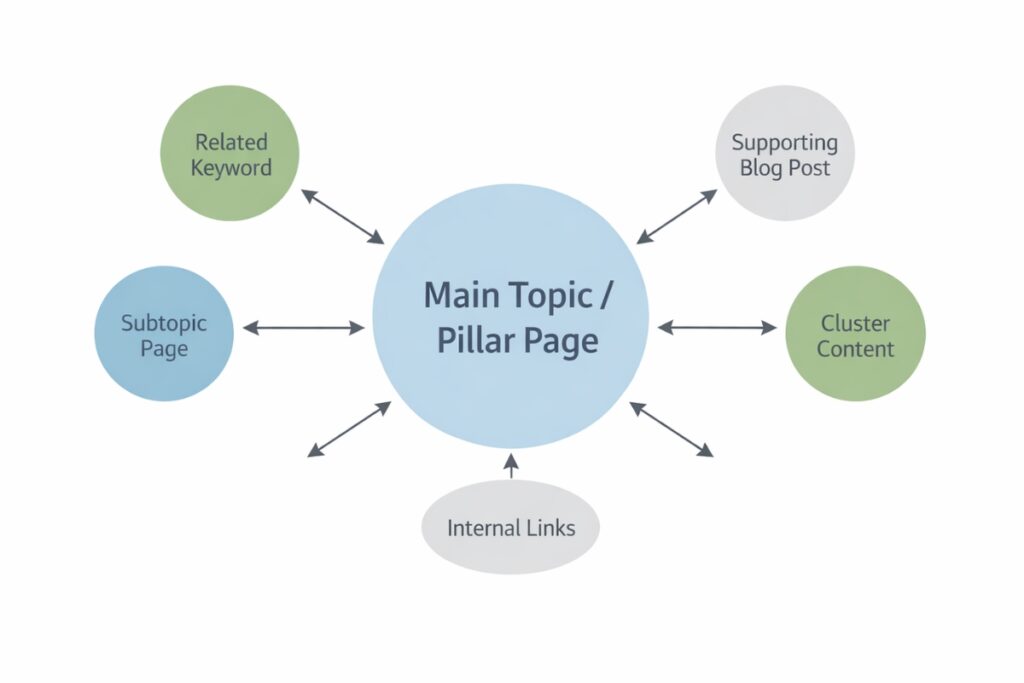
A pillar page covers a broad topic comprehensively. Cluster articles cover individual subtopics in depth. Internal links connect everything bidirectionally — the pillar links to all cluster articles, and every cluster article links back to the pillar.
Before adding internal links across your blog, map out which posts belong to which cluster. This gives you a clear picture of which pages should connect to each other.
Posts within the same cluster should link to each other frequently. Posts in unrelated clusters should link less often — only when there is a genuinely relevant connection.
Step 3: Add links to every new post before publishing
Make internal linking a non-negotiable part of your publishing workflow — not something you remember to do later.
Before publishing any new post, identify at least three to five existing posts on your blog that are closely related to the new content. Add contextual links to those posts within your new article wherever they fit naturally.
Then — and this step is commonly skipped — go back to those existing posts and add a link pointing to your new article. This bidirectional connection is what builds the cluster structure Google rewards with higher rankings.
Step 4: Conduct an internal link audit on existing posts
If your blog has been live for a while, you likely have older posts with few or no internal links — sitting in isolation, missing out on the ranking benefits they could receive.
Set aside time to systematically review your existing content. For each post, ask:
- How many internal links point to this post?
- Does this post link to other relevant pages on my site?
- Are there newer related posts that should link here?
- Are there opportunities to add links within the body text that feel natural?
This audit often reveals quick wins — posts that are already ranking on page two or three that could climb significantly with a few additional internal links pointing to them.
Step 5: Use your highest-traffic posts as link hubs
Your highest-traffic pages are the most valuable places to add internal links to other content.
When thousands of readers visit a popular post, any internal link within that post gets a proportionally larger number of clicks and sends stronger authority signals to the linked page.
Identify your five to ten most-visited posts using Google Analytics or Search Console. Then look at which important pages on your blog those posts are not currently linking to. Add natural contextual links where they fit.
This is one of the fastest ways to improve rankings on posts that are not getting enough link equity from the rest of your site.
Internal Linking Best Practices
Follow these principles consistently and your internal linking will be stronger than the vast majority of blogs in any niche.
- Link within the body text, not just at the bottom. Contextual links within paragraphs carry more SEO weight than links in footers or sidebar widgets.
- Aim for three to five internal links per post as a baseline. More is fine if the links are genuinely relevant. Fewer is a missed opportunity.
- Never force a link. If there is no natural connection between two posts, do not link them. Forced links confuse both readers and search engines.
- Vary your anchor text. Repeating the exact same anchor text across multiple links to the same page looks unnatural. Use partial match variations and branded anchors alongside exact match.
- Link to deep pages, not just your homepage. Your homepage already receives plenty of signals. Deep links to specific posts and pillar pages are where the real SEO value is.
- Fix or redirect broken internal links. A link that leads to a 404 error wastes link equity and creates a poor user experience. Check for broken links quarterly using a tool like Screaming Frog or the free Broken Link Checker plugin.
- Update older posts regularly. Every time you publish new content, go back to relevant older posts and add links to the new article. This is how you keep your cluster structure growing correctly.
Common Internal Linking Mistakes to Avoid
Even bloggers who understand the concept regularly make these errors.
Orphaned pages — Posts with no internal links pointing to them. These pages are nearly invisible to search engines. Every post on your site should receive at least two or three internal links from relevant content.
Over-linking within a single post — Adding fifteen internal links in a 1,000-word post looks spammy and dilutes the value of each link. Be selective and purposeful.
Only linking to old content — Many bloggers only add links to older posts from new ones, and never go back to update older posts to link forward to new content. Bidirectional linking is what builds cluster authority.
Ignoring anchor text quality — Using “click here” and “read more” as anchor text constantly misses the opportunity to send clear relevance signals to Google about where those links lead.
Linking to irrelevant pages — Connecting posts that have no genuine topical relationship creates noise in your site architecture. Google may interpret your site’s topic focus as less clear.
Never auditing existing links — Your internal link structure needs maintenance as your site grows. Old links may point to pages you have since redirected, deleted, or significantly changed. Regular audits keep everything working correctly.
A Simple Internal Linking Workflow You Can Start Today
You do not need a complicated system to implement good internal linking. Here is a repeatable process that takes fifteen minutes per post.
When publishing a new post:
- Search your own blog for three to five posts related to your new topic
- Add natural contextual links to those posts within the body of your new article
- Open each of those existing posts and add a link back to your new article where it fits naturally
- Confirm your new post links to your pillar page if it is a cluster article
Monthly maintenance:
- Open Google Search Console and identify posts with high impressions but low click-through rates
- Find two to three high-traffic posts that could naturally link to those underperforming pages
- Add contextual links from the high-traffic posts to the underperforming ones
- Check for broken internal links and fix or redirect them
Quarterly audit:
- Review your ten most important pages and count how many internal links point to each
- Identify which important pages have fewer than five internal links pointing to them
- Update relevant existing posts to add links toward those underlinked pages
This workflow takes less than an hour per month once it becomes habit. The compounding benefit it creates over six to twelve months is significant.
Final Thoughts
Internal linking is not glamorous. It does not get the same attention as backlink building or keyword research in most SEO conversations.
But it is one of the highest-leverage improvements most bloggers can make — because it costs nothing, takes little time, and the cumulative effect compounds month after month as your site grows.
Every internal link you add today is doing quiet, consistent work in the background. It is helping crawlers discover your content, passing authority to your most important pages and keeping readers on your site longer.
Start with the basics. Link your new posts to existing ones. Link your cluster articles back to your pillar pages. Use descriptive anchor text. Go back and audit older posts.
Do that consistently, and your internal linking strategy for blogs will be stronger than the vast majority of blogs competing in your niche.
For the full roadmap of growing your blog with search traffic, head back to our complete SEO guide for bloggers.
FAQs
Q1. What is internal linking in blogging?
Internal linking means connecting one page on your blog to another page on the same blog. When you reference a related topic in a post and link to your existing article on that topic, that is an internal link. It helps both readers and search engines navigate your content.
Q2. How many internal links should I add per blog post?
Three to five internal links per post is a solid baseline for most blog posts. There is no strict limit — more links are fine if they are all genuinely relevant. What matters most is that every link feels natural and adds value for the reader, rather than being forced in for SEO purposes alone.
Q3. Does internal linking actually improve search rankings?
Yes, meaningfully. Internal links help search engine crawlers discover your content, pass ranking authority between pages, and signal topical relevance. Pages that receive more internal links from relevant content consistently tend to rank higher than equally good pages with few internal links pointing to them.
Q4. What is anchor text and does it matter for internal links?
Anchor text is the clickable words of a link. For internal links, descriptive anchor text tells Google what the destination page is about, which strengthens the relevance signal. Using generic phrases like “click here” or “read more” wastes that opportunity. Always use specific, descriptive anchor text that naturally describes the linked page’s topic.
Q5. What is an orphaned page and why is it a problem?
An orphaned page is a post or page on your blog that has no internal links pointing to it. Because search engine crawlers follow links to discover content, orphaned pages may not get crawled regularly — which hurts their chances of ranking. Every important page on your blog should have at least two to three internal links pointing to it from relevant content.
Q6. Should I go back and add internal links to old blog posts?
Yes — and this is one of the highest-value SEO tasks you can do on an existing blog. Reviewing older posts and adding internal links to newer relevant content, and vice versa, strengthens your site’s cluster structure and can meaningfully improve rankings on posts that are already close to page one.