
Most bloggers think keyword research requires an expensive tool subscription.
It does not.
Some of the best keyword research happens with tools that cost absolutely nothing. Google itself gives you more data than most beginners know what to do with — for free.
This guide walks you through the complete process of finding keywords your blog can actually rank for, using only free tools and strategies. No credit card. No trial. No catch.
Let’s get into it.
Why Keyword Research Matters Before You Write Anything
Here is the hard truth most new bloggers discover too late.
You can write a genuinely brilliant blog post and still get zero traffic — simply because nobody searched for the topic you covered.
Keyword research solves that problem before it happens. It tells you exactly what your audience is already searching for, how many people search for it each month, and how hard it will be to rank for it.
Write content around what people are actively searching for, and traffic becomes a predictable outcome rather than a lucky accident.
What keyword research actually helps you do:
- Confirm there is real search demand before you spend hours writing
- Find specific phrases your blog can realistically rank for
- Understand what your audience wants to know at every stage
- Build a content plan that compounds traffic over time
- Avoid wasting effort on topics nobody searches for
Keyword research is not a one-time task. It is the foundation of every content decision you make.
For a full picture of how keyword research fits into your overall SEO strategy, read our complete SEO guide for bloggers.
Understanding the Two Types of Keywords
Before touching any tool, you need to understand the difference between the two main keyword types.
Short-tail keywords
These are broad, one-to-two-word phrases — “SEO,” “blogging,” “recipes,” “fitness.”
They get enormous search volume. They are also dominated by massive websites with years of authority. A new or mid-sized blog has almost no realistic chance of ranking for them right now.
Long-tail keywords
These are specific, three-to-six-word phrases — “how to start a food blog for beginners,” “best strength training routine for women over 40,” “PCOS-friendly breakfast ideas.”
They get lower individual search volume. But they are:
- Far easier to rank for
- Searched by people with very specific intent
- More likely to bring readers who engage, subscribe, and convert
- The realistic path to traffic for most bloggers
Your entire free keyword research strategy should focus on finding strong long-tail keywords first. Build traffic and authority there. Broader keywords come later.
Read the complete guide on short-tail keywords vs long-tail keywords.
Tool 1: Google Autocomplete — Your Most Powerful Free Resource
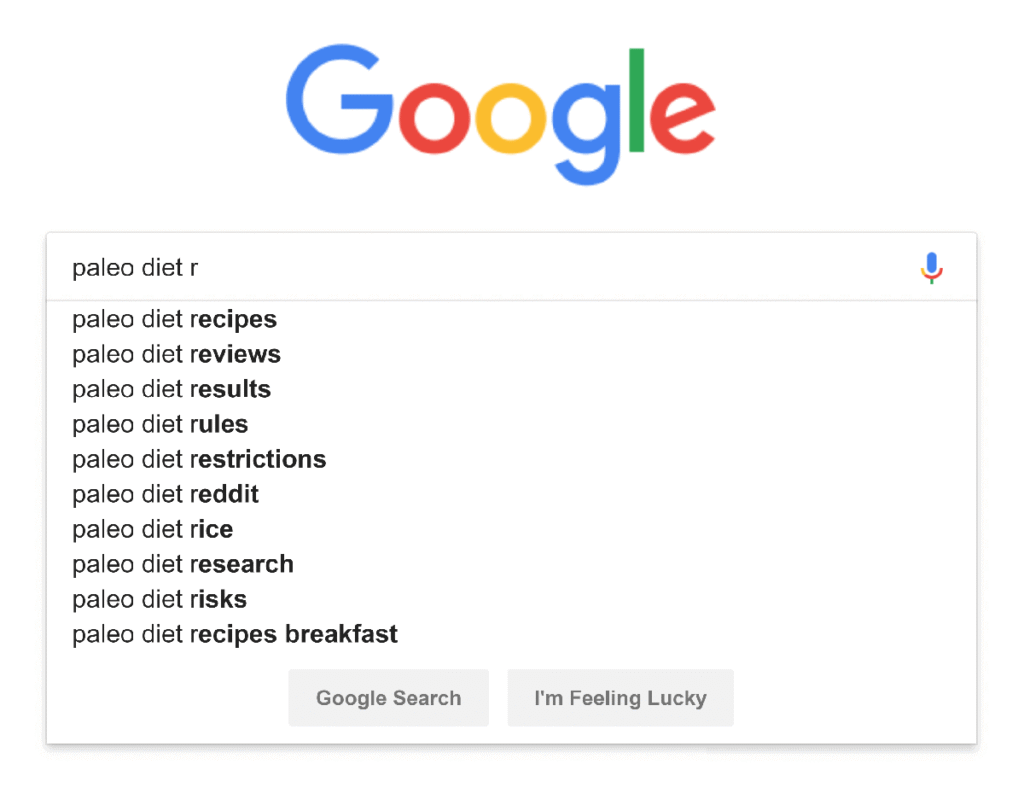
Open Google. Start typing your topic. Stop before pressing Enter.
See those suggestions that drop down? Those are real searches that real people make regularly. Google would not suggest them if nobody searched for them.
This is called Google Autocomplete, and it is genuinely one of the most underrated keyword research tools available — completely free, always updated, and powered by actual search data.
How to get the most out of it:
Type your topic and add different letters after it. For example, if your topic is “PCOS diet,” try:
- “PCOS diet a…” (PCOS diet and fertility, PCOS diet advice for beginners)
- “PCOS diet b…” (PCOS diet breakfast ideas, PCOS diet book)
- “PCOS diet f…” (PCOS diet for weight loss, PCOS diet foods to avoid)
Work through the alphabet. You will uncover dozens of keyword ideas in minutes.
Add question words at the start. Try:
- “how to [your topic]”
- “what is [your topic]”
- “why does [your topic]”
- “best way to [your topic]”
- “can I [your topic]”
Each variation reveals a different set of real search queries your audience uses.
Try variations with locations, timeframes, and qualifiers. Add “for beginners,” “without equipment,” “at home,” “in 2026,” or “fast” to your core topic and see what surfaces.
Collect every relevant suggestion in a simple spreadsheet. You are building your raw keyword list.
Tool 2: Google’s People Also Ask Box
Search any keyword in Google. Scroll slightly below the top results.
You will almost always see a box labelled People Also Ask. This contains real questions Google has identified as closely related to your search.
These questions are gold for keyword research. Each one represents a real search query — and often one with relatively low competition because it is phrased as a specific question rather than a broad keyword.
How to use it effectively:
Click any question in the box. It expands to show a brief answer. More importantly, the box automatically adds more related questions below.
Keep clicking. You can generate fifteen to twenty closely related question-based keywords from a single starting query.
These question-style keywords work especially well for:
- FAQ sections within longer posts
- Standalone short articles targeting very specific queries
- Subheadings within a pillar or cluster article
- Featured snippet opportunities (Google often pulls short answers directly into search results)
Copy every relevant question into your keyword spreadsheet. Note the original keyword you searched to generate it.
Tool 3: Google Related Searches
Scroll all the way to the bottom of any Google results page.
You will find a section called Related Searches — eight more keyword suggestions directly related to your original query.
These are not random. Google shows them because searchers who looked for your original keyword also frequently searched for these phrases. That makes them high-intent, closely related keyword ideas you might not have thought of yourself.
Search each related term separately. Each one generates its own new set of related searches at the bottom of the page.
This creates a branching keyword discovery process that can uncover dozens of related terms from a single starting point — entirely for free.
Tool 4: Google Keyword Planner
Google Keyword Planner is Google’s official keyword research tool. It is free with a Google account, though it requires setting up a Google Ads account to access (you do not need to run any ads or spend money).
What it shows you:
- Monthly search volume ranges for any keyword
- Related keyword ideas you may not have considered
- Competition level (low, medium, high) for paid advertising — which roughly indicates organic competition too
- Seasonal trends showing when search volume peaks
How to use it for blog keyword research:
- Go to ads.google.com and create a free account
- Navigate to Tools → Keyword Planner
- Click “Discover new keywords”
- Enter your topic or a seed keyword
- Review the results, filtering by relevance and volume
One important note: Keyword Planner shows volume ranges rather than exact numbers on free accounts — you might see “1,000 to 10,000” rather than a specific figure. This is still enough to understand relative demand and prioritize your keyword list.
Tool 5: Google Search Console — The Most Underused Free Tool
If your blog is already live and indexed, Google Search Console is the single most valuable free keyword tool you have access to.
Most bloggers set it up and forget about it. That is a significant mistake.
What Search Console shows you:
- The exact search queries bringing people to your site right now
- How many impressions (appearances in search results) each query gets
- Your average ranking position for each query
- Which pages are driving the most search traffic
The keyword opportunity hidden in your own data:
Go to Search Console → Performance → Search Results.
Filter by impressions and look for queries where your blog appears in search results but gets very few clicks. These are pages ranking on page two or three — positions 11 to 30.
These are your easiest ranking wins. You are already appearing for these searches. Small improvements to those posts — better title tags, stronger content, improved internal linking — can push them onto page one and dramatically increase your traffic without starting from scratch.
This is called optimizing for near-miss keywords, and it is one of the fastest ways to grow traffic from a blog that is already published.
Tool 6: AnswerThePublic
AnswerThePublic visualizes every question, comparison, and preposition-based search phrase people use around any topic.
Enter a keyword, and it generates a visual map of searches organized by:
- Questions (who, what, where, when, why, how)
- Prepositions (for, without, near, with, to)
- Comparisons (vs, like, and)
- Alphabetical variations
The free version allows a limited number of daily searches, which is more than enough for most bloggers doing regular research.
Best use cases:
- Finding question-based keywords for FAQ sections
- Discovering comparison angles (“X vs Y” posts tend to rank well)
- Identifying content gaps — topics your audience searches for that you have not covered yet
- Building out a full content calendar for a new topic cluster
Tool 7: Ubersuggest Free Tier
Ubersuggest offers a free tier that gives you genuine keyword data — including estimated search volume, SEO difficulty scores, and content ideas.
The free version limits daily searches, but it is enough to validate keyword ideas and shortlist your best opportunities.
What to check in Ubersuggest:
- Search volume — how many monthly searches the keyword gets
- SEO difficulty (SD) — scored 0 to 100; aim for under 40 as a beginner
- Content ideas — shows existing posts ranking for your keyword and their estimated traffic
Use Ubersuggest to validate the keywords you discovered through Google tools. If a keyword from your autocomplete research shows decent volume and low difficulty in Ubersuggest, it goes straight to the top of your publishing list.
How to Evaluate Keywords Once You Have a List
Collecting keyword ideas is only half the process. Now you need to prioritize them.
Run every keyword on your list through these four filters:
Filter 1 — Search Intent
What does the searcher actually want when they type this phrase?
- Are they looking to learn something? (write an informational post)
- Are they comparing options? (write a comparison or review)
- Are they ready to buy or sign up? (write a conversion-focused post)
Mismatching your content type to search intent is one of the most common reasons good posts fail to rank.
Filter 2 — Competition Level
Search your keyword in Google and look at the top five results. Ask yourself:
- Are these large, established publications with massive authority?
- Or are some results from smaller blogs similar in size to yours?
- Is the existing content genuinely comprehensive — or thin and outdated?
If smaller sites are ranking and the existing content has gaps, you have a realistic opportunity.
Filter 3 — Relevance to Your Niche
Does this keyword connect directly to your core topic? Will the people searching for it become regular readers of your blog?
Chasing high-volume keywords unrelated to your niche generates temporary traffic that does not convert into subscribers or loyal readers. Stay focused.
Filter 4 — Your Ability to Cover It Well
Can you write the most genuinely helpful article on this specific topic?
Do you have personal experience, specific knowledge, or access to information that makes your version better than what already exists?
If yes, publish it. If not, find a more specific angle where you can add real value.
Building Your First Keyword List — A Simple System
Here is a practical workflow for building your first keyword list from scratch, using only free tools.
- Start with your core topic — write it in the center of a blank document
- Run it through Google Autocomplete — collect every relevant suggestion
- Search the top five variations in Google — note the People Also Ask questions and Related Searches for each
- Validate your best candidates in Keyword Planner or Ubersuggest — confirm search volume and difficulty
- Filter your list by the four criteria above — intent, competition, relevance, your ability
- Rank your shortlist — prioritize low-competition, high-relevance keywords first
- Map keywords to content types — decide which keywords become standalone posts and which become sections within longer articles
A focused list of fifteen to twenty well-researched keywords gives you a full content calendar for several months.
Common Keyword Research Mistakes Beginners Make
Avoid these — they cost time and slow down results.
Targeting keywords that are too broad — “blogging tips” is not a realistic target for a new blog. “Blogging tips for stay-at-home moms with no experience” is far more winnable.
Ignoring search intent — writing an informational article for a keyword where searchers want a product comparison wastes your effort entirely.
Choosing keywords purely by volume — a keyword with 50,000 monthly searches and brutal competition is less valuable than one with 500 monthly searches and a clear path to page one.
Doing keyword research once and never returning — search trends change. New keywords emerge. Revisit your keyword research every two to three months.
Skipping competitor research — look at what keywords similar blogs in your niche rank for. Their success shows you what is possible and where gaps exist.
Final Thoughts
You do not need to spend a single dollar to do effective keyword research.
Google Autocomplete, People Also Ask, Related Searches, Keyword Planner, and Search Console together give you more keyword data than most beginners know how to use. Add AnswerThePublic and Ubersuggest’s free tier, and you have a complete research toolkit.
The advantage does not come from the tools. It comes from using them consistently and being more thorough than everyone else chasing the same keywords.
Start with one core topic. Build your list. Prioritize ruthlessly. Publish consistently.
That is how free keyword research turns into real, compounding blog traffic.
For the full roadmap of growing your blog with SEO from scratch, head back to our complete SEO guide for bloggers.
FAQs
Q1. Can I really do keyword research without paying for tools?
Yes, absolutely. Google Autocomplete, People Also Ask, Related Searches, and Google Keyword Planner are all completely free. Together they provide enough keyword data for most bloggers to build a full content strategy without spending anything.
Q2. What is the best free keyword research tool for beginners?
Google itself is the best starting point. Google Autocomplete and People Also Ask boxes are powered by real search data and cost nothing to use. Google Keyword Planner adds search volume estimates for free with a Google Ads account. Ubersuggest and AnswerThePublic offer useful free tiers as well.
Q3. What is a long-tail keyword and why should beginners target them?
A long-tail keyword is a specific, longer search phrase — usually three to six words. They have lower search volume than broad terms but are far easier to rank for. New and mid-sized blogs have realistic chances of reaching page one for long-tail keywords, even without high domain authority.
Q4. How do I know if a keyword is too competitive for my blog?
Search the keyword in Google and examine the top five results. If every result comes from large, high-authority publications and the existing content is comprehensive, the keyword is likely too competitive for now. Look for results from smaller blogs or posts with thin content — those signal a realistic opportunity.
Q5. How many keywords should I target per blog post?
Focus on one primary keyword per post. You can naturally include related phrases and variations throughout the content, but targeting one clear main keyword keeps your post focused and easier for Google to categorize correctly.
Q6. How often should I do keyword research?
Revisit your keyword research every two to three months. Search trends shift, new topics emerge in your niche, and competitor gaps open up over time. Treat keyword research as an ongoing process, not a one-time task you complete and forget.