
Backlinks still play a major role in SEO. They help search engines understand how trustworthy your website is. But getting random backlinks is not enough anymore. Search engines now focus on backlink quality, relevance, and diversity.
That is where a backlink profile matters.
If your website has spammy or low-quality links, your rankings can drop. If your backlinks come from trusted and relevant websites, your rankings can improve over time.
The good news is that you do not need expensive tools to start checking your backlinks. Many free tools can help you understand your backlink profile.
In this guide, you will learn:
- What a backlink profile is
- Why backlink audits matter
- How to check backlink profile free
- Which free tools work best
- How to spot harmful backlinks
- Ways to improve your backlink profile
What is a Backlink Profile?
A backlink profile is the complete collection of backlinks pointing to your website.
It includes:
- The websites linking to you
- The quality of those websites
- The anchor texts used
- The number of backlinks
- Follow and nofollow links
- The relevance of linking websites
Think of it as your website’s reputation score on the internet.
For example:
- A backlink from a respected health blog helps a health website
- A backlink from a trusted news website builds authority
- Hundreds of spammy links from unrelated sites can hurt rankings
Search engines study these patterns to decide how trustworthy your website is.
Why Your Backlink Profile Matters
A strong backlink profile can improve:
- Search rankings
- Organic traffic
- Domain authority
- Website trust
- Brand visibility
A poor backlink profile can lead to:
- Ranking drops
- Manual penalties
- Loss of trust
- Lower organic traffic
Google wants websites to earn links naturally. If your backlinks look manipulated, it becomes risky.
That is why backlink audits are important.
Signs of a Healthy Backlink Profile
A good backlink profile usually includes:
Relevant Backlinks
Links should come from websites related to your niche.
For example:
- Marketing blogs linking to SEO websites
- Health websites linking to wellness blogs
Natural Anchor Texts
Anchor text should look natural.
Examples:
- Brand names
- Website URLs
- Generic words like “click here”
- Relevant keyword variations
Diverse Sources
A healthy profile contains links from:
- Blogs
- News websites
- Directories
- Forums
- Business websites
Steady Growth
Backlinks should grow gradually.
Sudden spikes may look suspicious.
Signs of a Poor Backlink Profile
Watch out for these warning signs:
Spammy Websites
Low-quality websites often have:
- Thin content
- Too many ads
- Irrelevant topics
- Poor design
Over-Optimized Anchor Texts
Using the same keyword repeatedly looks unnatural.
Example:
- “Best SEO services”
- “Best SEO services”
- “Best SEO services”
Repeated many times can trigger spam signals.
Irrelevant Backlinks
A fitness website linking to a finance website may look suspicious.
Too Many Low-Quality Links
Quantity does not matter if quality is poor.
A few strong backlinks are better than thousands of weak ones.
How to Check Backlink Profile Free
You can audit backlinks without spending money.
Here are the best free methods.
Use Google Search Console
Google Search Console is the most reliable free tool.
It shows backlinks directly from Google.
How to Use It
- Open Google Search Console
- Select your website
- Go to “Links”
- Check:
- Top linked pages
- Top linking sites
- Top anchor texts
What to Look For
- Unknown websites
- Spammy domains
- Irrelevant backlinks
- Excessive keyword anchors
Google Search Console does not show every backlink. But it gives trustworthy data.
Use Ahrefs Free Backlink Checker
Ahrefs offers a free backlink checker with limited results.
You can see:
- Top backlinks
- Referring domains
- Domain Rating
- Anchor texts
How It Helps
This tool helps identify:
- Strong backlinks
- Spammy links
- Competitor backlinks
You can compare your site against competitors and find link opportunities.
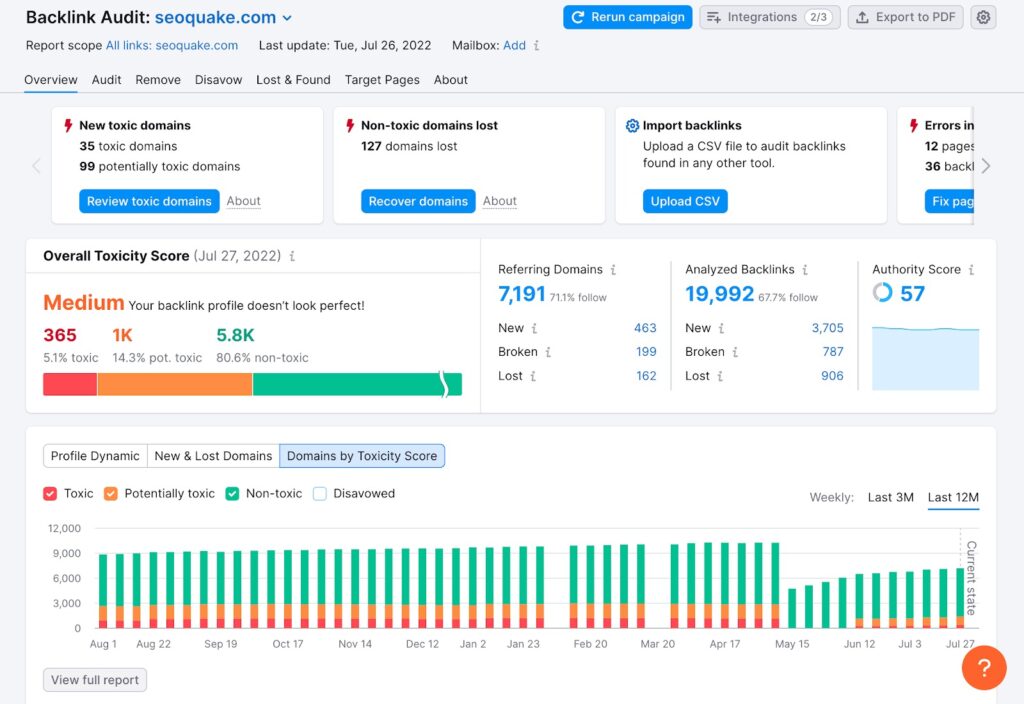
Use SEMrush Free Backlink Tool
SEMrush also provides backlink analysis features.
The free version gives limited access, but it is useful for beginners.
Features
- Referring domains
- Authority scores
- Toxic link indicators
- Anchor text analysis
This helps you understand the overall quality of your backlink profile.
Use Ubersuggest
Ubersuggest offers a beginner-friendly backlink overview.
It shows:
- Domain authority
- Backlinks
- Referring domains
- New backlinks
The dashboard is simple and easy to understand.
Use Moz Link Explorer
Moz offers free backlink insights with limited searches.
You can check:
- Domain Authority
- Linking domains
- Spam score
- Top pages
Spam score is especially useful during audits.
Step-by-Step Backlink Audit Process
Now let us understand how to audit backlinks properly.
Step 1: Collect Your Backlink Data
Use multiple tools because no tool shows every backlink.
Recommended combination:
- Google Search Console
- Ahrefs Free Checker
- Moz
- SEMrush
Export the backlink lists if possible.
Step 2: Review Referring Domains
Focus on the quality of websites linking to you.
Check:
- Website relevance
- Content quality
- Traffic levels
- Domain authority
Avoid websites created only for link manipulation.
Step 3: Analyze Anchor Texts
Anchor text diversity matters.
Healthy anchor texts include:
- Brand names
- URLs
- Generic phrases
- Partial keywords
Too many exact-match keywords may look unnatural.
Step 4: Identify Toxic Links
Toxic backlinks often come from:
- Spam directories
- Gambling websites
- Adult websites
- Fake blogs
- Link farms
These links can hurt rankings.
Step 5: Check Follow vs Nofollow Links
A natural backlink profile includes both.
Follow Links
These pass SEO value.
Nofollow Links
These usually do not pass ranking signals directly.
Both link types are normal and healthy.
Step 6: Monitor Link Growth
Sudden backlink spikes can look suspicious.
Natural growth happens steadily over time.
Track:
- New backlinks
- Lost backlinks
- Monthly trends
Common Backlink Audit Mistakes
Many website owners make these errors.
Ignoring Toxic Links
Spam links should not be ignored forever.
Monitor them regularly.
Focusing Only on Quantity
Hundreds of weak backlinks do not beat a few strong links.
Quality matters more.
Using Automated Link Building
Automated backlinks often create spam.
This can damage rankings.
Building Irrelevant Links
Relevance matters more than random authority.
A relevant backlink often performs better.
How to Improve Your Backlink Profile
Improving backlinks takes time, but it is worth the effort.
Create Valuable Content
Good content naturally earns backlinks.
Examples include:
- Guides
- Case studies
- Original research
- Statistics
- Infographics
Guest Posting
Write articles for relevant websites in your niche.
Focus on quality websites only.
Build Relationships
Connect with:
- Bloggers
- Website owners
- Journalists
- Industry experts
Networking can lead to natural backlinks.
Replace Broken Links
Find broken links on other websites and suggest your content as a replacement.
This method works well for outreach.
Earn Brand Mentions
Build your brand online.
People naturally link to trusted brands more often.
Should You Remove Bad Backlinks?
Not every low-quality link is dangerous.
But clearly spammy links may need attention.
First Option
Contact the website owner and request removal.
Second Option
Use Google’s Disavow Tool carefully.
Only use it when:
- You have many toxic backlinks
- You received a manual penalty
- Spam links are obvious
Improper use can hurt SEO.
How Often Should You Audit Backlinks?
Regular audits help prevent SEO problems.
Recommended schedule:
- Small websites: every 3 to 6 months
- Growing websites: every month
- Large websites: continuous monitoring
Frequent checks help detect issues early.
Free Backlink Tools Comparison
| Tool | Best For | Free Access |
| Google Search Console | Accurate Google data | Yes |
| Ahrefs Free Checker | Quick backlink overview | Limited |
| SEMrush | Toxic link analysis | Limited |
| Moz Link Explorer | Spam score checking | Limited |
| Ubersuggest | Beginner-friendly analysis | Limited |
Final Thoughts
Understanding your backlink profile is important for long-term SEO success.
A strong backlink profile helps improve rankings, traffic, and website trust. A weak profile can create SEO risks.
The good news is that you can learn how to check backlink profile free using beginner-friendly tools.
Start with Google Search Console and combine it with other free tools for better insights.
Remember these key points:
- Quality matters more than quantity
- Relevance is important
- Natural link growth looks safer
- Regular audits prevent SEO problems
Backlink audits may sound technical at first, but they become easier with practice. Even a simple monthly review can help protect your website rankings.
FAQs
What is a backlink profile?
A backlink profile is the collection of all backlinks pointing to your website.
Why is backlink profile important?
It helps search engines measure website trust, authority, and relevance.
How to check backlink profile free?
You can use free tools like Google Search Console, Ahrefs Free Checker, Moz, and Ubersuggest.
What are toxic backlinks?
Toxic backlinks come from spammy or low-quality websites and may hurt rankings.
How often should I audit backlinks?
Most websites should audit backlinks every 3 to 6 months.
Can bad backlinks hurt SEO?
Yes. Too many spammy backlinks may reduce rankings or trigger penalties.
Is Google Search Console enough for backlink analysis?
It is a good starting point, but combining multiple tools gives better insights.
What is a good backlink?
A good backlink comes from a relevant, trustworthy, and high-quality website.