
Guest posting sounds simple. You write a post, a site publishes it, and you get traffic and a link. In real life, the hard part is finding sites that say yes.
For a long time, I hunted for sites one by one. I would search, pitch, and wait. Then I would start from zero again. It wasted hours and gave me weak results.
Everything changed when I built a list of sites in one place. This post shows how to build guest post inventory step by step, using the same process I followed. You do not need paid tools or a big team. You need a spreadsheet, a few search tricks, and steady daily effort.
This post is part of our content series. If you are new to growing a blog, start with our content marketing for bloggers guide. Then come back here to build your list.
What Is a Guest Post Inventory?
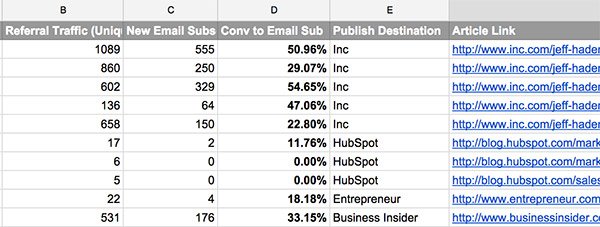
A guest post inventory is an organized list of websites where you can publish articles. Think of it as your personal database. Each row is one site, and each column holds key details.
A good inventory includes:
- The site name and web address
- The topic it covers
- Contact name and email
- Guest post rules and word count
- Quality notes and traffic estimates
- Your pitch status
It is not a random list of links. Every site on it has passed your checks. That is what makes it useful.
Why You Need One
Without a list, guest posting stays messy. You forget who you pitched. You pitch the same site twice. You chase poor sites because they were easy to find.
An inventory fixes this. Here is what it gave me:
- Speed. I pitch from a ready list instead of searching each time.
- Better quality. I only pitch sites that pass my checks.
- Clear tracking. I know who replied, who said no, and who needs a follow-up.
- Less stress. I always know my next move.
- Better results. More relevant sites means better traffic and trust.
Guest posts also support your wider strategy. They build authority and bring new readers to your blog. Our guide on SEO for bloggers explains how links help your rankings over time.
Step 1: Set Your Goals and Filters
Before you search, decide what a good site looks like. Without filters, you will collect junk and waste time.
Define Your Goal
Ask yourself what you want from guest posts. Your answer shapes your list.
- More traffic: Look for sites with active readers and strong social shares.
- More authority: Look for respected sites in your niche.
- More email subscribers: Look for sites whose readers match your offer.
Write Your Filter Rules
I used a short set of rules. A site had to meet most of them before it entered my list.
- The site covers a topic close to mine.
- It publishes new content on a regular basis.
- It has real readers, shown by comments or shares.
- It accepts outside writers.
- It looks clean and trustworthy.
Write your rules down. Keep them in the first tab of your sheet. You will use them every day.
Step 2: Find Sites to Add
This is where most of the work happens. I used several methods at once. Each one finds different sites.
Use Search Phrases
Google is the easiest tool. Many sites that accept guest writers say so openly. Try these searches with your niche word:
- “write for us” + your niche
- “guest post guidelines” + your niche
- “become a contributor” + your niche
- “submit a guest post” + your niche
- your niche + “accepting guest posts”
Change the word order and try new niche terms. Check the first three pages of results, not just the first.
Study Where Others Publish
Look at bloggers in your niche. Check where they write as guests. Most bloggers list their guest posts in their author bio or on an “as seen on” page.
Search for a blogger’s name plus “guest post.” You will find many sites in minutes. If a site accepted a writer like you, it may accept you too.
Check Competitor Backlinks
A free backlink checker can show who links to a competitor. Look for links from articles with an author bio. Those are often guest posts.
Free versions limit how much data you see. That is fine. A few pages of results can fill dozens of rows.
Use Social Media and Communities
Many editors share calls for writers on social platforms. Search hashtags like #guestpost and #writeforus. Join niche groups where site owners chat. Some sites do not advertise, but they say yes when asked politely.
Step 3: Record the Right Details
When you find a site, add it to your sheet right away. Do not wait. You will forget details, and you will repeat work.
Here are the columns I used:
- Site name
- URL
- Niche or topic
- Contact name
- Contact email or form link
- Guest post page link
- Word count and format rules
- Link policy (one link, bio only, and so on)
- Traffic estimate
- Quality score (1 to 5)
- Status (not pitched, pitched, replied, published, rejected)
- Date of last contact
- Notes
It looks like a lot, but adding one row takes about two minutes. The notes column is the most valuable one. Write why the site fits you. That detail makes your pitch stronger later.
Step 4: Check Each Site Before You Keep It
A big list means nothing if the sites are weak. I checked every site before it earned a spot. This step protects your name and your time.
My Quick Quality Check
Spend about five minutes per site. Look at these points:
- Content quality: Are the posts well written and useful?
- Fresh posts: Did they publish something in the last month?
- Real engagement: Do posts get comments or shares?
- Clean design: Is the site easy to read, without heavy pop-ups?
- Real authors: Do posts carry real names and bios?
Red Flags That Mean Skip
Remove a site if you see any of these:
- It publishes on every topic, from pets to casinos.
- It sells guest posts in bulk with price lists.
- Its posts are full of ads or spammy links.
- Nobody comments, shares, or reads it.
- The writing is poor or looks copied.
Be careful with paid placements. Search engines may treat paid links as a link scheme. If a site charges, ask for a “sponsored” or “nofollow” tag. When unsure, skip it.
Step 5: Organize Your Sheet Into Tiers
After a few dozen sites, your list needs structure. I split mine into three tiers. This helped me pick targets and set my effort.
- Tier 1: Dream sites. These are large, respected sites. Acceptance is harder, so I spent more time on each pitch.
- Tier 2: Solid sites. These are good sites with decent readers. Most of my guest posts came from here.
- Tier 3: Easy wins. These are smaller sites with friendly editors. They helped me build samples and confidence.
A good mix is a few Tier 1 sites and a bigger group of Tier 2. Add some Tier 3 for quick wins. Use color codes or a filter column. Then you can sort in one click.
Free Tools That Make the Job Easier
You do not need a costly tool stack. I kept mine simple and mostly free.
- Google Sheets or Excel: This is your main home. Use filters, color codes, and drop-down menus for status.
- A free backlink checker: It shows who links to your competitors.
- A browser extension for SEO data: It shows rough traffic and site strength while you browse.
- An email finder: It helps you locate an editor’s contact when the site hides it.
- A notes app: Use it to save topic ideas that fit certain sites.
Paid tools can save time later. Still, start with free ones. The process matters more than the tool. Once your habit is steady, you can decide if an upgrade is worth it.
Step 6: Reach 100 Sites With a Daily Habit
Reaching 100 sites sounds big. It feels easy when you break it up. I used a simple daily target.
- 10 sites per day for 10 days. This gets you to 100.
- Or 5 sites per day for 20 days. This works if you have less time.
I set a timer for 45 minutes each day. In that time, I searched, checked, and added new rows. When the timer ended, I stopped. Short, steady sessions beat one long weekend of work.
Block Time Into Your Week
Treat this task like any other part of your content plan. Add it to your calendar. If you need help with scheduling, our content calendar for bloggers guide shows a simple way to do it.
Step 7: Pitch From Your List and Track Results
A list only helps when you use it. Once you have 20 or 30 good sites, start pitching. Do not wait for all 100.
Keep Your Pitch Short
Editors get many emails. Short pitches get read. Here is the structure I used:
- A greeting with the editor’s name
- One line on why you like their site
- Two or three topic ideas that fit their readers
- A short line on who you are, with one or two writing samples
- A polite close
Never send the same copy to everyone. Use your notes column to add one real detail per site. It shows you did your homework.
Deeper dive: Link Building Outreach Email Templates That Actually Get Replies
Follow Up and Log Everything
Wait about a week. If you hear nothing, send one friendly reminder. After that, move on.
Update your status column after every action. Write the date, the reply, and any next step. Over time, your sheet shows which sites reply fastest and which topics get a yes.
Step 8: Keep Your List Fresh
A list gets old. Sites close, editors leave, and rules change. I set aside one hour each month to clean mine.
My monthly check:
- Remove sites that stopped posting.
- Fix bounced emails.
- Update guest post rules.
- Add five to ten new sites.
- Move strong performers up a tier.
This habit is the key to how to build guest post inventory that lasts. A fresh list of 100 beats a stale list of 300.
Quick Tips From My Own Workflow
A few small habits made the whole process smoother.
- Save the guest post page link, not just the home page. It saves you time later.
- Add a “best topic idea” note for each site as you go.
- Keep two or three finished writing samples ready to share.
- Batch your work. Research one day, pitch the next.
- Celebrate small wins, like your first reply.
These habits are tiny, but they add up. They keep you moving when the work feels slow.
Common Mistakes to Avoid
I made a few mistakes on the way. You can skip them.
- Chasing numbers over quality. A hundred weak sites will not help you.
- Skipping the vetting step. Bad links can hurt your site.
- Pitching without reading the site. Editors spot lazy emails fast.
- Forgetting to track. You will lose leads and repeat work.
- Giving up after a few no’s. Most pitches fail at first. That is normal.
- Writing weak guest posts. Your post is your sample. Make it your best work.
How Guest Posting Fits Your Bigger Plan
Guest posts work best as part of a full plan. They bring readers, but you must give those readers a reason to stay.
Make sure your own blog is ready. Link your author bio to a strong page, such as a topic hub. Our guide on topic clusters for blogs shows how to build one.
Then share each guest post after it goes live. Post it on social media and mention it in your newsletter. Our post on how to promote a blog post after publishing gives simple ideas that work for guest posts too.
Final Thoughts
Building a list of 100 sites took effort, but it paid off. I stopped guessing and started pitching with a clear plan. Learning how to build guest post inventory turned a messy task into a simple routine.
Start small. Set your filters, add your first ten sites, and keep going each day. In a few weeks, you will have a list that works for you.
Want the full picture of growing your blog? Read our content marketing for bloggers guide to see where guest posting fits. Your first hundred sites are closer than you think.
FAQs
What is a guest post inventory?
It is an organized list of sites where you can publish articles. Each row holds details like contacts, rules, quality notes, and pitch status.
How many sites should I add to my list?
Aim for 50 to 100 good sites. Quality matters more than size, so vet every site before you keep it.
Do I need paid tools?
No. A spreadsheet, Google, and a free backlink checker are enough to start. You can add paid tools later if you need them.
How long does it take to build a list of 100 sites?
About 10 to 20 days if you add 5 to 10 sites a day. A 45-minute daily session works well.
How do I know if a site is worth pitching?
Check that it covers your topic, posts often, has real readers, and looks trustworthy. Skip sites that sell bulk posts or publish on every topic.
Should I pay for guest posts?
Be careful. Search engines may treat paid links as a link scheme. If you pay, ask for a “sponsored” or “nofollow” tag.
How often should I update my list?
Do a quick check once a month. Remove dead sites, fix bounced emails, and add a few new ones.
Can I start pitching before the list is complete?
Yes. Start once you have 20 to 30 good sites. You can keep growing the list as you pitch.