
You spend hours writing a great blog post. Then nobody clicks on it in search results. Sound familiar? Your meta description might be the problem.
Even great content gets ignored with a weak preview. People decide whether to click within seconds.
Let’s fix that. This guide shows you exactly how to write meta descriptions people actually want to click.
What Is a Meta Description?
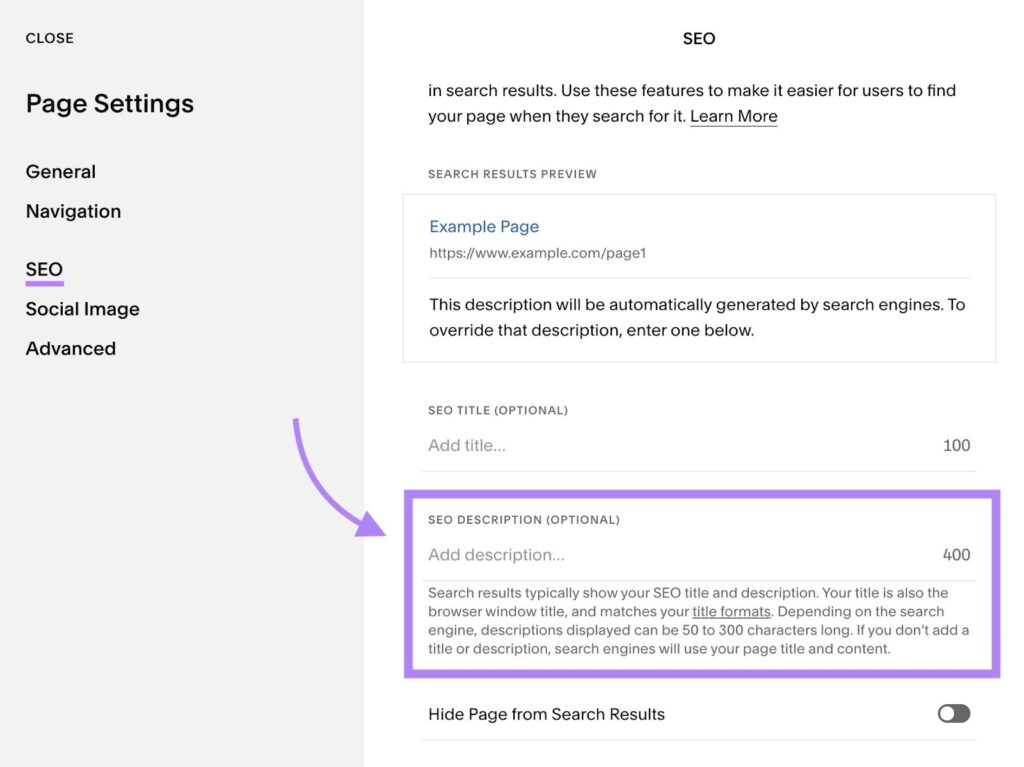
A meta description is the short text under your title in search results. It’s your chance to convince someone to click your link instead of scrolling past.
Google doesn’t always use your written description. But when it does, a good one boosts your click-through rate significantly.
Think of it as a mini sales pitch. You’re not writing for search engines here. You’re writing for real, curious humans.
If you want the bigger picture on ranking your blog, check out our complete guide to SEO for bloggers. This post focuses specifically on meta descriptions.
Why Meta Descriptions Actually Matter
Meta descriptions don’t directly boost your rankings. But they strongly influence whether people click your result.
More clicks often lead to better rankings over time. Google notices when people prefer your result over others.
A weak or missing meta description hurts your visibility. Google might pull a random sentence from your post instead, and it rarely sounds appealing.
Meta Descriptions vs Title Tags
These two elements work together but serve different jobs. Understanding the difference helps you write both better.
Your title tag is the clickable headline in search results. It should include your main keyword and grab attention fast.
Your meta description supports that headline with more context. It explains the value and convinces readers to actually click through.
Think of your title as the hook and your description as the reason to bite.
The Ideal Meta Description Length
Length matters more than people realize. Too long, and Google cuts it off awkwardly.
- Aim for 120 to 155 characters total
- Mobile screens often show even less space
- Front-load your most important message first
- Always check how it looks in a preview tool
Going slightly under the limit is safer than going over. Cut-off descriptions look unfinished and unprofessional.
Every character counts, so avoid filler words that don’t add real value.
How to Write a Meta Description Step by Step
Ready for the actual process? Here’s exactly how to write one that works.
Step 1: Understand Search Intent First
Before writing anything, ask what the searcher actually wants. Are they looking for a quick answer or deep information?
Match your description to that intent. A recipe search wants speed and simplicity. A guide search wants depth and authority.
Understanding intent shapes every word choice after this step.
For example, “how to write meta description” signals a learning intent. Readers want clear steps, not just a definition.
Step 2: Include Your Keyword Naturally
Search engines often bold matching keywords in results. This draws the eye and signals relevance immediately.
Don’t force it awkwardly, though. Your keyword should fit naturally into a normal sentence.
Good example: “Learn how to write a meta description that boosts clicks.”
Forced example: “Meta description meta description tips for meta description writing.”
Step 3: Highlight the Benefit
Tell readers what they’ll gain by clicking. Focus on the outcome, not just the topic.
- What problem does your post solve?
- What will readers learn or achieve?
- Why should they choose your post over others?
Answering these questions creates a stronger, more persuasive description.
A benefit-focused line always outperforms a vague, generic summary of your topic.
Step 4: Use Active, Action-Focused Language
Active voice sounds more direct and confident. It also saves valuable character space.
Passive: “Tips for meta descriptions can be found in this post.”
Active: “Discover simple tips for writing better meta descriptions.”
Action verbs like “learn,” “discover,” or “get” create momentum and energy.
They also make your description feel more personal, like you’re speaking directly to the reader.
Step 5: Add a Clear Call to Action
A small nudge can boost clicks significantly. Give readers a reason to act now.
- “Learn the simple steps today.”
- “Get started with these easy tips.”
- “See exactly how it works.”
Keep it short and natural, not pushy or salesy.
Even a two or three word nudge at the end can make a real difference in clicks. It signals urgency without sounding forced.
Examples of Good vs Bad Meta Descriptions
Seeing real examples makes this concept click faster. Let’s compare a few side by side.
Bad: “This post talks about meta descriptions and why they matter for SEO and blogging in general.”
Good: “Struggling with low clicks? Learn how to write meta descriptions that actually get clicked.”
Bad: “Home page of our blog with articles about food, travel, and lifestyle topics.”
Good: “Discover easy recipes, travel guides, and lifestyle tips in one place. Start exploring now.”
Notice how the good examples feel personal and specific. They speak directly to the reader’s interest.
Bad: “Information about writing tips, blogging advice, and content strategy for beginners.”
Good: “New to blogging? Get simple writing tips that make your posts easier to read.”
The best examples always answer one question fast: what’s in it for me?
Common Meta Description Mistakes to Avoid
Even experienced bloggers slip up here sometimes. Watch out for these common issues.
- Writing the same generic description for every page
- Stuffing multiple keywords unnaturally into one sentence
- Going way over the character limit
- Leaving the meta description completely blank
- Copying your first paragraph instead of writing something new
Each of these mistakes weakens your click-through potential. Small fixes here often bring noticeable traffic improvements.
Go through your top ten posts this week. Chances are, a few of them have one of these issues waiting to be fixed.
Tools That Help You Write Better Meta Descriptions
You don’t have to guess or eyeball character counts. These tools make the process much easier.
- Yoast SEO – shows a live preview and character counter
- Rank Math – similar preview feature with SEO scoring
- Google Search Console – shows real click-through rates over time
- SERP preview tools – simulate exactly how your listing appears
Using these tools takes the guesswork out completely. You’ll see problems before they go live.
Most of these tools are free or have a free version. There’s no excuse to skip this simple check.
Meta Description Templates You Can Reuse
Sometimes a simple template speeds up the writing process. Try adapting these for your own posts.
- “Learn how to [achieve result] with these simple [number] tips.”
- “Struggling with [problem]? Discover easy ways to [solution] today.”
- “Want to [desired outcome]? Here’s exactly how to get there.”
- “Find out why [topic] matters and how to [action] the right way.”
These templates work as starting points, not rigid rules. Adjust the wording until it sounds natural for your topic.
Writing Meta Descriptions for Different Content Types
Not every page needs the same style. Adjust your approach based on what you’re promoting.
Blog Posts
Focus on the reader’s problem and the solution you provide. Highlight one clear takeaway they’ll gain.
Homepage
Introduce your blog’s overall value in a broad but inviting way. Mention your main topics or niche clearly.
Category or List Pages
Summarize what readers will find on that page. Mention the range or variety available, like “20+ recipes.”
Matching your description style to the page type improves relevance. It also sets accurate expectations for visitors.
Test and Improve Over Time
Your first attempt doesn’t have to be perfect. Meta descriptions can always be refined later.
Check Google Search Console every few months. Look at click-through rates for your top pages.
If a page gets impressions but few clicks, rewrite the description. Small wording changes can noticeably shift performance.
Treat this as an ongoing habit, not a one-time task. Your best-performing pages deserve regular attention.
Should Every Meta Description Include the Keyword?
Ideally yes, but don’t force it if it breaks readability. A natural sentence beats an awkward keyword insertion every time.
Google can bold partial keyword matches too. So near-matches often still work well in search results.
Prioritize sounding human first. Rankings follow clicks, and clicks follow genuinely appealing descriptions.
At the end of the day, you’re writing for a person scrolling through a list of options.
Final Thoughts
Meta descriptions might seem small, but they carry real weight. A well-written one can noticeably boost your click-through rate.
Focus on clarity, benefit, and a natural tone. Skip the keyword stuffing, and write for actual humans first.
Start rewriting a few of your older posts today. Small tweaks here often bring surprisingly quick results.
Give it a few weeks, then check your search console data. You’ll likely see a real, measurable difference in clicks.
FAQs
-
How long should a meta description be?
Aim for 120 to 155 characters. Longer descriptions often get cut off in search results.
-
Does the meta description affect Google rankings directly?
Not directly, but it boosts click-through rates, which can indirectly support better rankings.
-
Should I include my keyword in the meta description?
Yes, when it fits naturally. Google often bolds matching keywords in search results.
-
What happens if I don’t write a meta description?
Google may pull a random sentence from your post instead, which often looks less appealing.
-
Can I use the same meta description for every post?
No. Each post needs a unique description matching its specific content and value.