
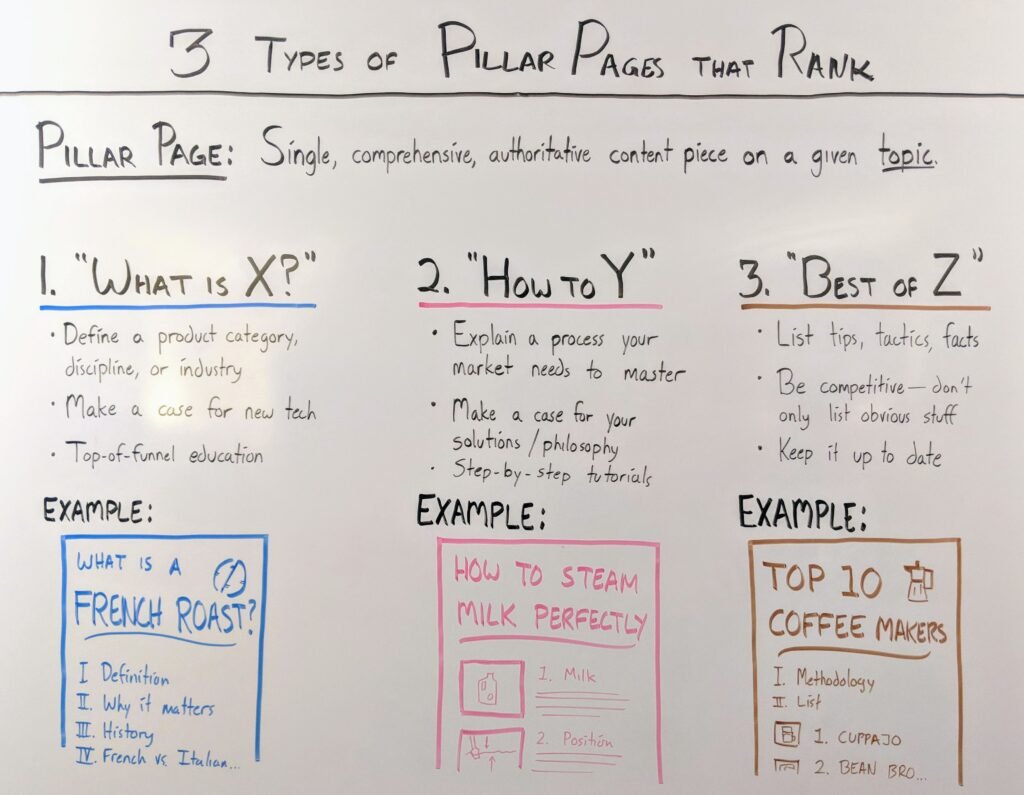
If you’ve ever asked yourself what is a pillar page in SEO, you’re in the right place.
Pillar pages sound complicated at first. They’re not. Once you understand the idea, writing one becomes a lot more manageable.
This guide walks through exactly how to build a pillar page that ranks well and actually helps your readers. No fluff, just a clear process you can follow.
What Is a Pillar Page?
A pillar page is a broad, in-depth guide covering one core topic. It acts as the main hub for that topic on your blog.
Instead of covering everything in scattered posts, a pillar page brings the big picture into one place. Smaller, focused posts then link back to it.
Think of it like a table of contents that’s also a complete article. It answers the main questions, then points readers toward deeper posts for specific details.
Search engines like this structure too. It signals that your site covers a topic thoroughly, not just in bits and pieces.
Why Pillar Pages Matter for SEO
Search engines want to show the most useful, complete answer for a search query. A well-built pillar page fits that goal directly.
Here’s what pillar pages do for your SEO:
- Signal topical authority. One strong hub page shows search engines you cover a topic in depth.
- Improve internal linking. Pillar pages naturally connect to related posts, spreading authority across your site.
- Target broader keywords. Cluster posts can’t easily rank for broad terms, but pillar pages can.
- Keep readers on your site longer. A well-organized hub encourages readers to explore more of your content.
- Make your content easier to update. One central page is simpler to refresh than dozens of scattered posts.
None of this happens by accident. It comes from planning the page with structure and intent from the start.
Pillar Pages vs. Cluster Content
It helps to understand how pillar pages and cluster posts work together, since they’re not the same thing.
A pillar page covers a broad topic at a high level. It’s comprehensive but not overly detailed on any single subtopic.
A cluster post goes deep into one specific piece of that topic. It answers a narrower question in full detail.
Here’s a simple way to picture it:
- The pillar page is the overview: “Content Marketing for Bloggers”
- Cluster posts are the deep dives: “How to Build a Content Calendar”
- Internal links connect them both ways, pillar to cluster and cluster to pillar
Neither works as well alone. The pillar gives structure. The clusters give depth. Together, they build real topical authority.
Step 1: Choose the Right Pillar Topic
Not every topic makes a good pillar page. Choosing the right one matters more than any other step.
Look for topics that are:
- Broad enough to support five or more cluster posts
- Central to your niche, not a minor side topic
- Searched often enough to be worth the effort
- Something you can cover credibly, based on real knowledge or experience
Avoid picking a topic just because it has high search volume. If it doesn’t connect naturally to several subtopics, it won’t function well as a pillar.
A good test: can you list at least five specific questions or subtopics within it? If yes, it’s probably a strong pillar candidate.
Step 2: Research What Your Audience Needs
Before writing anything, figure out what your readers actually want to know about this topic.
A few reliable ways to research this:
- Search your main topic and study the top-ranking pages
- Check the “People Also Ask” section in search results
- Read comments and questions on your own related posts
- Browse forums or communities where your audience asks questions
- Look at what subtopics competitors cover, and note any gaps
This research shapes your outline. It also helps you spot subtopics worth turning into future cluster posts.
Skipping this step often leads to pillar pages that sound complete but miss what readers are actually searching for.
Step 3: Structure Your Pillar Page
Structure is what separates a true pillar page from a long, unfocused post. Readers and search engines both need to follow it easily.
Start With a Clear Table of Contents
Add a table of contents near the top. It helps readers jump to the section they need and gives search engines a clear outline of your page.
Use Descriptive Subheadings
Each major section should have its own clear subheading. This makes the page skimmable and easier to navigate.
Organize by Logical Sections
A strong pillar page structure usually includes:
- An introduction explaining the topic and why it matters
- Foundational sections covering the basics
- Deeper sections covering strategy or process
- Links out to cluster posts for more detail
- A conclusion summarizing the key takeaways
Keep Paragraphs Short
Long, dense paragraphs push readers away. Short paragraphs, with the occasional bullet list, keep the page readable even at length.
Good structure does more than help SEO. It makes a genuinely useful resource people want to bookmark and return to.
Add Visual Breaks
Images, pull quotes, or simple dividers between sections give readers a natural place to pause. On a long pillar page, these small breaks matter more than they seem to.
They also help readers scanning on mobile, where long unbroken sections feel even longer than they do on desktop.
Step 4: Write Content That Covers the Topic Fully
A pillar page needs real depth, not just length. Padding a page with filler doesn’t help readers or rankings.
A few principles to keep in mind while writing:
- Answer the core questions directly. Don’t make readers dig for the point.
- Cover the topic broadly, not narrowly. Save the narrow details for cluster posts.
- Use plain language. Complex vocabulary doesn’t make content sound smarter, just harder to read.
- Include examples where they help. Concrete examples make abstract advice easier to apply.
- Keep a consistent, conversational tone. It’s easier to trust content that sounds human.
Understanding what is a pillar page in SEO also means understanding its job: to be complete enough that a reader doesn’t need to look elsewhere for the basics.
Aim for genuine usefulness first. Length and depth tend to follow naturally when you’re actually covering a topic well.
Step 5: Add Internal Links to Cluster Content
Internal linking is what turns a pillar page from a standalone article into a true content hub.
A few best practices for linking:
- Link to each cluster post from the relevant section of the pillar page
- Use descriptive anchor text that tells readers what they’ll find
- Make sure each cluster post links back to the pillar page too
- Update the pillar page whenever you publish a new related cluster post
- Avoid linking to unrelated content just to add more links
This linking structure helps readers navigate naturally. It also helps search engines understand how your content connects across the whole topic.
If you don’t have cluster posts yet, that’s fine. Build the pillar first, then add links as you publish each new piece.
Step 6: Optimize for On-Page SEO
Good structure and useful content go a long way, but a few on-page basics still matter.
- Use your target keyword naturally in the title, an early subheading, and a few times in the body
- Write a clear meta description that accurately describes the page
- Add descriptive alt text to any images you include
- Use one clear H1 and organize subheadings logically under it
- Keep your URL short and readable, ideally matching your main topic
Avoid stuffing keywords repeatedly throughout the page. It reads poorly and search engines are good at spotting it. Natural, occasional use works better than forced repetition.
Step 7: Promote and Update Your Pillar Page
Publishing your pillar page isn’t the finish line. Promotion and upkeep keep it performing well over time.
Promote It Like Cornerstone Content
Share your pillar page in your email newsletter, pin it on social media, and link to it from relevant guest posts when possible. Treat it as one of your most important pages, because it is.
Update It Regularly
Topics evolve, and so should your pillar page. Revisit it every few months to:
- Add links to new cluster posts
- Update outdated statistics or examples
- Refresh sections that feel thin compared to newer content
A pillar page that stays current tends to hold its rankings far better than one left untouched for years.
Set a Recurring Reminder
Add a quarterly reminder to revisit your top pillar pages. Treat it like routine maintenance, not an optional extra task on your list.
Common Mistakes to Avoid
A few recurring mistakes trip up otherwise solid pillar pages.
- Choosing a topic too narrow to support clusters. If there’s nothing to link to, it’s not really a pillar.
- Writing without structure. A wall of text, even a long one, doesn’t function like a real hub page.
- Forgetting internal links. Without them, you lose most of the SEO benefit a pillar page offers.
- Treating it as a one-time project. Pillar pages need regular updates to stay useful and relevant.
- Overstuffing keywords. It hurts readability and doesn’t help rankings the way people assume.
Avoiding these mistakes matters more than chasing any single ranking trick.
How Long Does It Take a Pillar Page to Rank?
Pillar pages usually take longer to rank than smaller, narrow posts. That’s normal, given how broad the topic usually is.
Most pillar pages start showing meaningful traction within three to six months, especially once a few cluster posts are linked in. Full ranking potential often takes six months to a year, particularly in competitive niches.
Consistent updates and steady internal linking speed this timeline up. A pillar page left static rarely improves much after its first few months.
Final Thoughts
A strong pillar page takes real effort, but it pays off for years, not weeks.
Pick a topic broad enough to support real depth. Structure it clearly. Write it to genuinely help readers, not just to hit a word count. Then link it to your cluster content, and keep it updated as your blog grows.
Done well, a single pillar page can become one of the most valuable pages on your entire site.
It’s worth the extra planning up front, since a strong pillar keeps paying off long after you hit publish, quietly supporting every cluster post you link to it.
FAQs
What is a pillar page in SEO?
It’s a broad, in-depth guide covering one core topic, acting as a central hub that links to related cluster posts.
How long should a pillar page be?
Most effective pillar pages run 2,000 words or more, though the right length depends on how much the topic genuinely requires.
How many cluster posts does a pillar page need?
Five to ten cluster posts is a common starting range, though this depends on how broad your topic is.
Can a pillar page rank without cluster posts?
Yes, but it performs better over time once cluster posts are linked in, since that structure builds topical depth.
Should I update my pillar page after publishing?
Yes. Regular updates keep it accurate and help it hold its rankings as the topic and your content evolve.
Do pillar pages need a table of contents?
It’s not required, but it improves usability significantly, especially on longer pages readers may want to skim.
What’s the difference between a pillar page and a regular blog post?
A pillar page covers a broad topic comprehensively and links to related posts. A regular post usually covers one narrow idea.
Can a short post work as a pillar page?
Rarely. Pillar pages need enough depth to meaningfully introduce every major subtopic within the larger theme.