
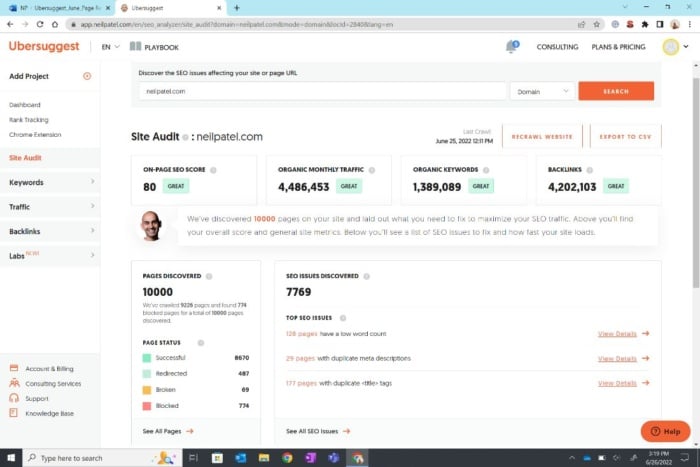
If you’re in the SEO or content marketing world, you’ve probably heard the name Ubersuggest multiple times. But what exactly is it? Is it worth using? And more importantly—how do you actually use Ubersuggest step by step to grow your traffic?
Whether you’re an agency owner, a blogger, or a small business trying to build visibility, understanding how Ubersuggest works can significantly elevate your SEO strategy.
This comprehensive guide breaks down:
What is Ubersuggest?
lass=”yoast-text-mark” />><strong>What does Ubersuggest do?
>What Ubersuggest is used for?
How to use Ubersuggest step-by-step (with screenshots guidance)
Power workflows for keyword research, competitor spying, and content planning
Who should use Ubersuggest—and who shouldn’t
Let’s dive in.
What Is Ubersuggest?
Ubersuggest is an all-in-one SEO tool created by Neil Patel to help marketers, website owners, and beginners perform keyword research, site audits, competitor analysis, backlink tracking, and content planning—all inside one simple dashboard.
In plain English:
👉 Ubersuggest helps you understand what people are searching for, how hard it is to rank, and what content you should create to grow your traffic.
Because “what is uber suggest” (a common misspelling) gets searched frequently, let’s clarify it:
Ubersuggest and Uber Suggest are the same thing—people simply spell it differently.
What Does Ubersuggest Do? (Core Features Explained Simply)
Here are the main things Ubersuggest can do for you:
-
Keyword Research
Find keywords your audience searches for—along with volume, difficulty, cost per click, and competition.
-
Competitor Research
Identify your competitors’ top pages, keywords, and backlinks.
-
Site Audit (Technical SEO)
Scan your site for SEO issues such as broken links, missing tags, speed issues, and mobile problems.
-
Backlink Analysis
Discover which websites link to you (and your competitors), what links you lost, and what links you can gain.
-
Content Ideas & SEO Insights
Get blog post ideas based on trending keywords and high-performing competitor content.
-
Rank Tracking
Monitor your keyword rankings daily or weekly to see growth.
-
Ubersuggest Chrome Extension
See keyword metrics directly on Google SERP while searching.
In short:
👉 Ubersuggest is used for keyword research, SEO audits, competitor analysis, backlink tracking, and content planning.
Why Ubersuggest Became Popular
While tools like Ahrefs and SEMrush are powerful, they’re expensive. Ubersuggest became popular because:
Easy to use—even for beginners
Budget-friendly compared to other SEO tools
Offers all essential features in one dashboard
Great for bloggers, freelancers, and small businesses
Includes training and actionable suggestions
Now let’s get into the real value…
How to Use Ubersuggest (Step-by-Step Guide for Beginners)
Below is the exact workflow I teach clients and beginners. You can follow this from scratch even if you’ve never used an SEO tool before.
Step 1: Create an Account & Setup Your Project
- Go to ubersuggest.com
- Sign up using Google or email
- Add your website as a Project
- Input your target keywords and competitors
- Verify your site (optional but recommended)
Creating a project allows Ubersuggest to:
Track your keyword positions
Send weekly SEO updates
Run recurring website audits
Step 2: Keyword Research (Your SEO Foundation)
This is the feature most people use Ubersuggest for.
How to Do Keyword Research in Ubersuggest:
- Go to the Keyword Ideas tool
- Enter your seed keyword
(e.g., “email marketing”, “yoga classes”, “best coffee”) - Ubersuggest will show:
- Search volume
- SEO difficulty
- Paid difficulty
- Keyword suggestions
- Related keywords
- Long-tail variations
- Question-based keywords
What to Look For:
Keywords with good search volume
Low-to-medium SEO difficulty
Clear search intent
Long-tail keywords that are easier to rank
Pro Tip:
Use the “Questions” tab for content ideas like:
- “How to do email marketing for small business?”
- “What is the best yoga class for beginners?”
These rank fast and attract high-intent traffic.
Step 3: Competitor Research (Your Secret Weapon)
Ubersuggest makes it extremely easy to spy ethically on what’s working for your competitors.
How to Analyze Competitors:
- Go to Traffic Analyzer → Top Pages
- Enter your competitor’s domain
- Ubersuggest will show:
- Their top pages
- Estimated visits
- Keywords those pages rank for
- Backlinks to each page
What to Look For:
Competitors’ high-traffic pages
Weak pages you can outrank
Gaps in their content
Keywords they rank for but you don’t
Content Strategy Hack:
Pick your competitor’s top-ranking article → create a more detailed, updated, better version → add visuals and expert insights → optimize better → promote.
This alone can skyrocket your SEO.
Step 4: Create SEO-Optimized Content (Using Ubersuggest Insights)
Before writing a blog post, follow these steps:
-
Check Keyword Overview
This shows:
Keyword difficulty
Search trend
Average backlinks needed
Content ideas
Estimated traffic potential
-
Use Content Ideas Section
Analyze:
Article titles
Social shares
Estimated visits
Backlinks
You will quickly see what kind of content performs well.
-
Build Your Content Outline
Include:
- Main keyword
- Supporting keywords
- Search intent
- Key questions to answer
- Suggested H2 & H3 structure
-
Upload Your Draft to Ubersuggest
Under the SEO Editor, Ubersuggest evaluates your content and gives:
Readability score
Keyword suggestions
SEO optimization percentage
This ensures your content is search-engine friendly.
Step 5: Run a Complete Site Audit
A Site Audit identifies technical SEO issues that hurt rankings.
Steps:
- Go to Site Audit
- Click Run Audit
- Check:
- On-page SEO score
- Critical errors
- Warnings
- Page speed
- Indexed pages
- Broken links
- Missing meta tags
Focus on fixing:
Critical errors
Mobile issues
Slow pages
Duplicate content
Broken internal links
Fixing these alone improves ranking significantly.
Step 6: Backlink Analysis & Opportunities
Links still matter for SEO. Ubersuggest helps you find link-building opportunities quickly.
Do this:
- Enter your domain in Backlinks
- Check new & lost backlinks
- Compare your links with competitors
- Identify websites linking to them
- Reach out to get similar links
Use the “Backlink Opportunities” tab
This shows:
Sites linking to competitors but NOT YOU
High-authority websites
Pages where outreach can work
Step 7: Track Your Keyword Rankings Automatically
Go to Rank Tracking → Add your keywords → Set location → Save.
Ubersuggest will show you:
Daily/Weekly ranking movement
Gains/losses
Pages performing best
Which keywords reached page #1
This is crucial for measuring what’s working.
Who Should Use Ubersuggest?
Bloggers
Affiliate marketers
Website owners
Local businesses
Agencies
Coaches / Consultants
Beginners who want simple SEO
Who Should Not Use Ubersuggest?
If you need extremely deep backlink data or enterprise-level competitive intelligence, Ahrefs or SEMrush will be more suitable.
But for 90% of marketers?
👉 Ubersuggest is more than enough.
Final Thoughts: Is Ubersuggest Worth It?
Absolutely—if you want a simple, affordable tool for SEO growth.
It helps you:
Find the right keywords
Create content that ranks
Fix site issues
Understand competitors
Track SEO progress
The best part?
You don’t need to be an SEO expert to use it.