
I didn’t take website spam seriously in the beginning.
When I launched my blogs, I focused on content, traffic, SEO, backlinks, and monetization. Spam felt like a minor inconvenience — a few annoying comments, random form submissions, weird emails.
Then I checked my analytics one day.
Traffic spikes from suspicious countries.
Hundreds of fake contact form entries.
Toxic backlinks.
Bot-driven crawl activity.
That’s when I realized something important:
If you don’t actively spam protect your website, you’re leaving your digital business vulnerable.
Spam is not just annoying.
>It wastes server resources.
>It damages SEO.
>It ruins user experience.
>It can even lead to security breaches.
So in this article, I’m sharing 18 practical, expert-level tips I personally recommend to protect against spam and truly shield your website from spam long-term.
No fluff. Just actionable steps.
-
Install a Strong Firewall (WAF)
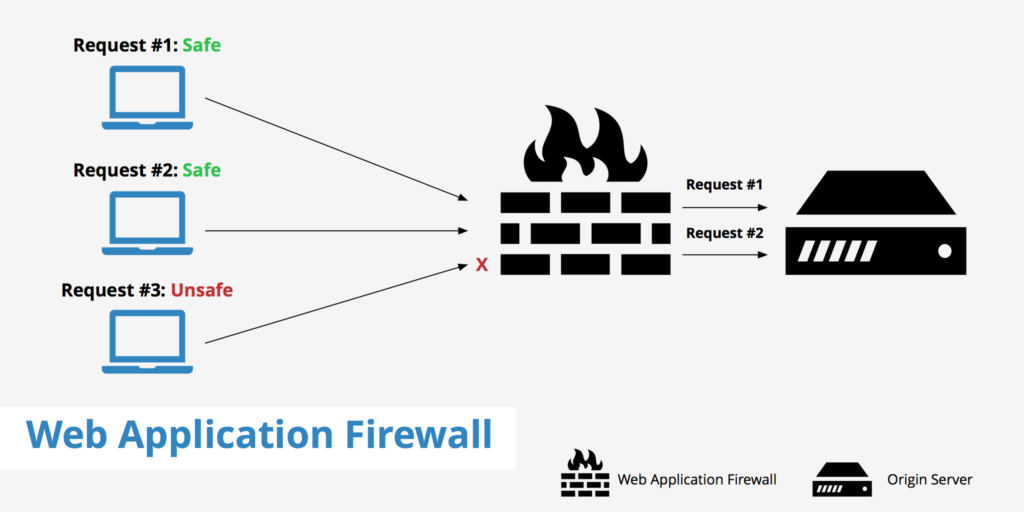
The first thing I recommend is setting up a Web Application Firewall.
A WAF filters incoming traffic before it even reaches your server. It blocks:
- Known malicious IP addresses
- Bot traffic
- Injection attempts
- Automated spam scripts
Without a firewall, your website is exposed at the front door.
This is your first and most powerful layer of spam protection.
-
Use Advanced CAPTCHA (Not Just Basic Ones)
I used to rely on basic CAPTCHA.
Big mistake.
Modern bots can bypass outdated CAPTCHA systems easily.
Instead:
- Use invisible CAPTCHA or behavior-based systems
- Enable smart bot detection
- Combine CAPTCHA with rate limiting
CAPTCHA alone is not enough — but it’s still an essential layer if implemented correctly.
-
Disable Automatic Comment Approvals
If your blog allows comments, never auto-approve them.
I’ve seen spam comments packed with:
- Casino links
- Adult content
- Malware redirects
Set comments to manual moderation or use AI moderation tools.
Spam comments can destroy credibility overnight.
-
Add Honeypot Fields to Forms
Honeypots are invisible fields humans don’t see — but bots fill them automatically.
When that hidden field is completed:
- The system flags it as spam
- The submission is rejected
This method is simple, invisible to users, and highly effective.
It’s one of the easiest ways to protect from spam without affecting user experience.
-
Limit Form Submission Frequency
Spam bots don’t behave like humans.
They submit forms:
- Multiple times per second
- From the same IP
- In rapid bursts
Use rate limiting.
For example:
- Limit one submission per IP every 60 seconds
- Block repeated rapid attempts
- Automatically blacklist suspicious activity
This dramatically reduces bot abuse.
-
Enable Email Verification
If you allow user registrations:
- Require email verification
- Use double opt-in
- Block disposable email domains
Many spam accounts use temporary email services.
Email verification eliminates large volumes of fake registrations.
-
Block Suspicious Countries (If Relevant)
Check your analytics.
If 90% of your business comes from specific regions, but spam comes from unrelated countries, consider:
- Geo-blocking
- Restricting access
- Adding additional verification for high-risk regions
This is not about discrimination.
It’s about risk management.
-
Keep WordPress (or CMS) Updated
Outdated CMS versions are spam magnets.
Hackers and bot scripts scan for:
- Old plugin vulnerabilities
- Unpatched themes
- Deprecated PHP versions
Regular updates:
- Close security loopholes
- Prevent automated exploit spam
- Improve system resilience
I never delay updates anymore.
-
Delete Unused Plugins and Themes
Every unused plugin is a potential vulnerability.
Even inactive plugins can:
- Be exploited
- Contain outdated code
- Open hidden backdoors
If you don’t need it, delete it.
Minimal systems are more secure systems.
-
Monitor Your Backlink Profile
Spam is not only on your website.
Sometimes it’s happening off your website.
Negative SEO attacks can send:
- Toxic backlinks
- Automated spam domains
- Link farms pointing to your site
Regularly audit backlinks.
Disavow harmful domains if necessary.
If you ignore it, your rankings can slowly decline.
-
Use Strong Password Policies
Weak passwords invite brute-force attacks.
Enforce:
- Minimum 12-character passwords
- Two-factor authentication
- Login attempt limits
Most spam intrusion attempts begin at the login page.
Strengthen it.
-
Disable XML-RPC If Not Needed
XML-RPC is often exploited for:
- Brute-force login attempts
- Pingback spam
- Bot attacks
If you don’t actively use it, disable it.
Reducing attack surfaces is one of the smartest ways to shield your website from spam.
-
Protect Contact Forms with Smart Filters
Contact forms are spam magnets.
I recommend:
- Blocking suspicious keywords
- Auto-flagging links inside submissions
- Using AI spam filters
- Blocking multiple URLs in one submission
If your inbox is flooded, your productivity suffers.
And as someone running service-based blogs, I can’t afford that.
-
Use a Dedicated Anti-Spam Plugin
There are plugins designed specifically to protect against spam.
They:
- Analyze user behavior
- Check IP reputation
- Scan for automated patterns
Don’t rely on a single tool.
Layer your protection.
-
Monitor Server Logs Regularly
Most website owners never look at server logs.
That’s a mistake.
Logs reveal:
- Repeated suspicious IPs
- Bot crawling patterns
- Injection attempts
- Failed login spikes
If you want to spam protect effectively, you must monitor activity — not just react to visible problems.
-
Clean Your Database Regularly
Spam doesn’t just clutter comments.
It also bloats:
- Database tables
- User tables
- Revision history
Database clutter slows your website.
Slow websites are vulnerable websites.
Regular cleanup improves:
- Speed
- Security
- Stability
-
Secure Your Hosting Environment
Cheap hosting often equals weak security.
I’ve learned that reliable hosting matters.
Look for:
- Malware scanning
- Automatic backups
- Server-level firewalls
- DDoS protection
Your hosting provider plays a massive role in whether you can truly protect from spam.
-
Educate Yourself About New Spam Trends
Spam evolves constantly.
What worked two years ago may not work now.
Stay updated on:
- AI-generated spam bots
- Comment automation tools
- SEO spam injection techniques
- Fake traffic bot networks
Website security is not a one-time setup.
It’s ongoing maintenance.
Why Spam Protection Is More Important Than Ever
As someone focused on SEO and monetization, I’ve realized something critical:
Spam affects revenue indirectly.
It can:
- Slow your website
- Hurt rankings
- Damage trust
- Waste team time
- Reduce conversion rates
When you spam protect properly, you’re not just improving security.
You’re protecting:
- SEO performance
- Brand credibility
- Lead quality
- Advertising ROI
That’s business protection.
My Personal Philosophy on Website Spam
In the beginning, I treated spam like background noise.
Now I treat it like a strategic threat.
If your long-term goal is to monetize via services — like content marketing, link building, PPC, analytics, or AI-driven SEO — then your website is your authority asset.
You cannot allow spam to:
- Pollute your brand
- Reduce trust
- Lower performance
Spam protection is not optional.
It is foundational.
Final Thoughts
To spam protect your website properly, think in layers:
- Firewall protection
- Form security
- CMS updates
- Login hardening
- Backlink monitoring
- Hosting security
No single solution will protect against spam entirely.
But layered security dramatically reduces risk.
If you take even half of these 18 tips seriously, you’ll already be ahead of most website owners.
And in digital business, being ahead in security means staying ahead in growth.